

Why turning your photos into music-backed videos is the best kind of silly therapy
Have you ever looked at old pictures and wished they could tell a story with a bit more zing? Maybe you have a bunch of funny pet photos or silly family moments just sitting on your phone. Well, good news! Learning how to make photos videos with music can be like a mini vacation for your mind. It’s a simple way to boost your mood and create shareable laughs with friends and family.
Think about it. A short video clip, set to a fun song, can bring those static images to life in a whole new way. It’s pure, silly therapy that doesn’t cost a thing but your time. You don’t need to be a tech wizard to figure out how to make videos from photos with music in 2026. Many tools make it super easy. This guide will walk you through everything you need to know.

We’ll cover how to choose the right tools for making videos with pictures and music, pick the perfect songs, and easily put your pictures together. We’ll even touch on some important things about using music so you can share your creations worry-free. Get ready to turn your favorite memories into hilarious, heartwarming, and truly unique videos with pictures and songs. You might even find yourself inspired to generate funny video ideas for TikTok Reels YouTube Shorts as you go.
Want More Good Humor? Meet a book series made for readers who like funny and thoughtful. Want More Good Humor?
Now that you’re ready to dive into making these fun videos, the very first step is picking out your pictures. This is where the magic really starts, especially if you want your video to tell a funny story or have a big laugh at the end. It’s all about how to make photos videos with music that truly pop.
Choosing Images for Storytelling and Humor
When you look through your photos, don’t just pick pretty ones. Think about which pictures can "talk" to each other. Do some photos show a problem and others a solution? Can one picture set up a joke and another deliver the punchline?
Here’s what to look for:
- Expressions: Funny faces, surprised looks, or even a pet’s confused glance can add a lot of humor.
- Actions: Pictures of someone in the middle of doing something silly, falling over, or looking clumsy are perfect.
- Contrasts: Maybe you have a picture of a messy room followed by a perfectly clean one. Or a calm pet and then a wild one. These differences can be very funny.
- Unexpected Moments: Sometimes, a photo taken at just the right second can be hilarious without any planning.
Thinking about visual comedy is really helpful here. It’s about how pictures, not just words, can make people laugh. Filmmakers often use smart camera tricks and editing to create humor in their videos, and you can do something similar with your photos. For example, watching how experts like Edgar Wright approach How to Do Visual Comedy can give you ideas for your own simple videos.
Sequencing Photos for the Perfect Timing
Once you have a bunch of funny photos, the next big step in learning how to make videos from photos with music is putting them in the right order. This is super important for comedy. Think of it like telling a joke: you have a setup, and then you have the punchline.
- Build-up: Start with a few photos that set the scene or introduce the "problem." Maybe a series of pictures where someone is trying to do something and failing a little bit each time.
- The Punchline: This is the photo that delivers the big laugh. It should be placed right after the build-up. It might be the moment of total chaos, the funniest expression, or the unexpected outcome.
- Rhythm with Music: The timing of when each photo appears and disappears is key. When you add music, try to match the cuts to the beat or the mood of the song. A fast beat might mean quick photo changes, while a slower part of the song could let a funny picture linger a bit longer for effect.
Learning how to make videos with pictures and music means you’re almost like a mini-movie director. You’re crafting a story, even if it’s just a silly one. Your goal is to make your audience feel the humor through the pictures and the rhythm you create.

If you enjoy making videos that get a chuckle, you might also like exploring how to use video face swap turn any clip into instant comedy with ai for even more laugh-out-loud moments. It’s another fun way to play with visuals and create instant comedy.
After you’ve placed your funny photos in just the right order, the next big step in learning how to make photos videos with music is choosing the perfect soundtrack. The music you pick can make your video even funnier, or it can totally mess up the joke. It’s like having a great punchline but delivering it in a boring voice.
How Music Mood, Speed, and Words Change the Joke
When you pick music for your photo video, think about three main things:
- Mood: Is the song happy and bouncy, or slow and silly? A playful, upbeat tune often works best for a lighthearted video. If your pictures show something clumsy, a slightly dramatic or "oopsie" sound could make it funnier.
- Tempo (Speed): How fast or slow is the music? Fast music goes well with quick changes of funny pictures, making the humor feel energetic. Slower music can make a funny picture linger, giving people more time to laugh at it. Imagine a silly walk set to fast music versus slow music; they feel very different.
- Lyrics (Words): This is super important! Sometimes, songs have words that don’t match your funny pictures at all. If the song is about something sad, but your video is about a pet doing something goofy, it won’t make sense and might even confuse people. You want the words, if there are any, to add to the fun or at least not get in the way. Actually, some music can have really Dumbest Lyrics which might be funny on their own, but not for your video. When you choose background music, think about if the words help tell your silly story or if it’s better to pick a song without words. You can always check out quizzes like FINISH THE LYRICS TikTok Songs 2026 Edition Music Quiz to get a feel for popular song lyrics.
Simple Rules for Picking Music That Makes People Laugh
Here are some easy tips for picking music that will make your funny photo videos even better:
- Keep it simple: Often, instrumental music (music without singing) works best because the words won’t distract from your pictures.
- Match the energy: If your photos are fast and full of action, pick upbeat, quick music. If they show a slow, funny moment, a slower, playful tune might be better.
- Use trending songs wisely: Current trending songs can make your video feel fresh and fun, but make sure they really fit the mood and don’t have lyrics that clash. You can find many Top Trending songs on youtube shorts 2026! if you want to use popular tunes.
- Test it out: Always watch your video with the music before you share it. Does it still make you laugh? Does the music make the funny parts even funnier? If something feels off, try a different song.
- Don’t be afraid to be silly: Sometimes, choosing a very serious song for a very silly video can be hilarious because of the contrast. But use this trick carefully, so it doesn’t just make the video confusing.
By thinking about the mood, speed, and words of your chosen music, you’ll learn how to make videos with pictures and songs that truly shine.

You’re becoming an expert at how to make videos with pictures and music that tell a complete, funny story. If you’re looking for more ways to spark your creative side, consider how to generate funny video ideas for TikTok Reels YouTube Shorts.
Making funny videos with your photos and music is a great way to bring joy to others and yourself. It’s all about making people smile and even laugh out loud. For more adventures in humor, why not pick up a book that promises a good chuckle? Laugh First Today could be your next read!
Now that you’ve got a good handle on picking the perfect funny music, let’s get into the actual steps to bring your photos and songs together. It’s easier than you might think to learn how to make videos with pictures and music. This is your basic roadmap to making your funny photo video come alive.
Basic editing workflow – assemble, sync, and let the laugh land
Making a video from your photos and music follows a simple set of steps. Think of it like putting together a funny puzzle.
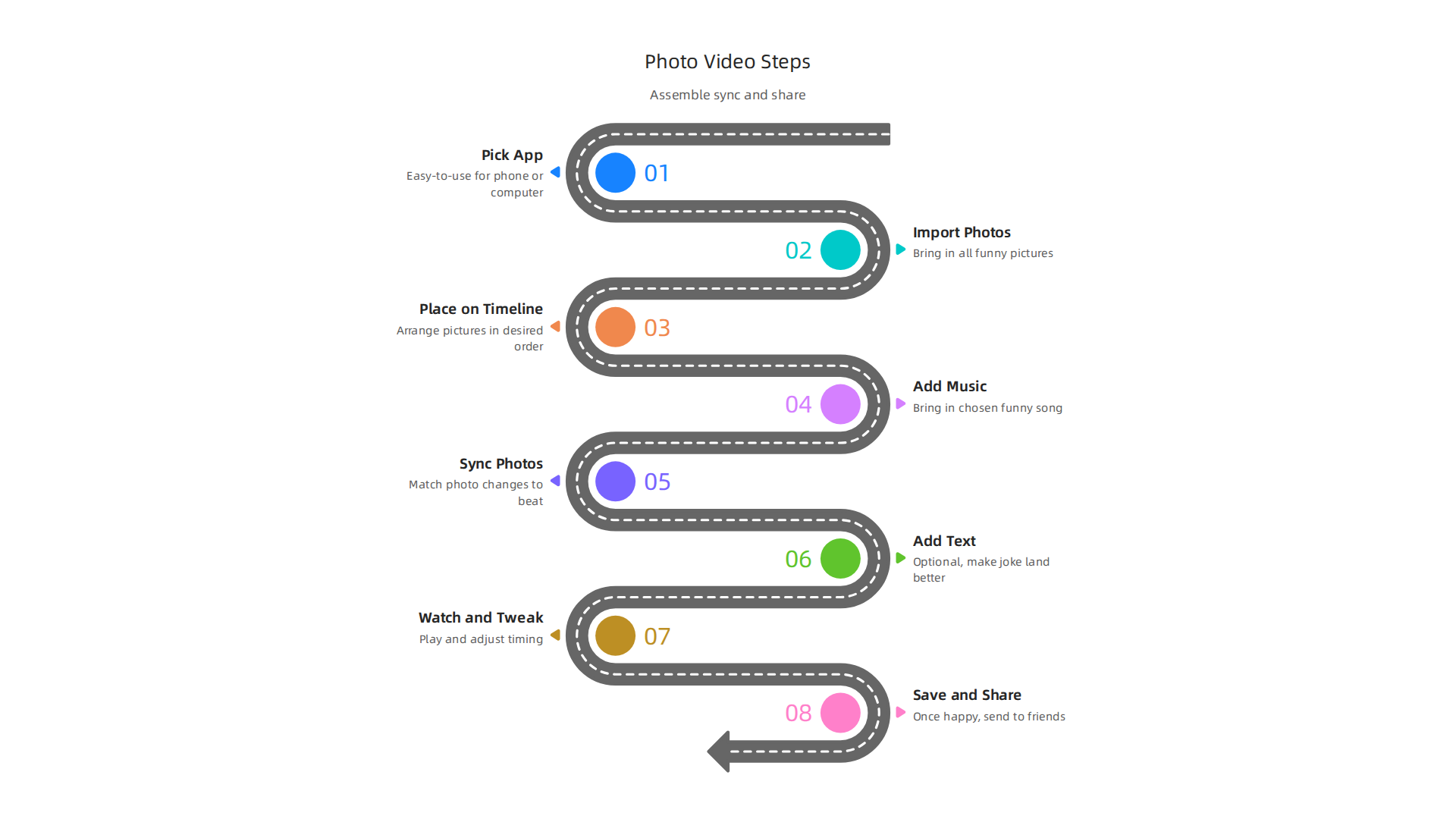
Step-by-Step for Funny Photo Videos
- Pick Your Video Editing App: First, you need a tool. In 2026, there are tons of easy-to-use apps for your phone or computer. Some good choices for beginners include iMovie for Apple users, or apps like Filmora, Kinemaster, and Inshot for all devices. Many people find apps like Choosing the Right Video Editing Software for Beginners and Students very helpful. There are also apps made just for this, like the Photo Video Maker With Music – Apps on Google Play for Android phones. You can check out a bigger list of 25 Video Editing Apps That Will Actually Fix Your Workflow to find one that suits you.
- Import Your Photos: Open your chosen app and bring in all the funny pictures you’ve picked out. Most apps have a clear "Import" or "Add Media" button.
- Place Photos on the Timeline: This is where you arrange your pictures in the order you want them to appear. The "timeline" is like a long strip where your video plays out. Drag and drop your photos one by one. You can make each photo last longer or shorter.
- Add Your Chosen Music: Now, bring in the funny song you picked. You’ll usually see an "Add Music" or "Audio" option. Place the music track underneath your photos on the timeline.
- Sync Photos to the Music: This is a key trick for how to make videos from photos with music really funny. Listen to your music. Does it have a clear beat or a funny sound effect at a certain point? Try to make your photos change right at those moments. This means shortening or lengthening how long each photo stays on screen. When a new picture pops up with a beat, it makes the humor stronger.
- Add Text or Stickers (Optional): Many apps let you add words or silly stickers to your photos. This can make the joke land even better. For example, if a photo shows a cat making a funny face, you might add the text "Thinking about snacks."
- Watch and Tweak: Play your video from start to finish. Does it flow well? Are the funny moments timed perfectly with the music? If not, move things around. This is your chance to make sure your video is as funny as possible.
- Save and Share: Once you’re happy, save your video and share it with friends and family. Get ready for some laughs!
Practical Shortcuts for Beginners
Don’t worry if it sounds like a lot. Most apps made for "how to make videos with pictures and songs" have shortcuts:
- Drag-and-Drop: Most beginner apps let you simply drag your photos and music right onto the timeline. No fancy menus needed.
- Auto-Align: Some apps have tools that try to automatically match your pictures to the beats of the music. This can be a good starting point, but you’ll likely want to fine-tune it yourself for best comedic effect.
- Simple Cut and Trim: Making a photo shorter or longer on the timeline is often as easy as dragging its edge. You don’t need to be a movie editor to master basic cuts.
By following these easy steps, you’ll soon be a pro at how to make photos videos with music that truly entertain. And once you’ve mastered the basics, you might even want to explore more advanced ways to make people laugh, like trying a video face swap turn any clip into instant comedy with AI.
After you’ve learned the basics of how to make videos with pictures and music, it’s time to make them even funnier! This means adding little touches that make people really laugh. Think of it as adding secret ingredients to a funny recipe. You can use captions, time your jokes just right, and add cool visual effects.
Add captions, timing gags, and playful visual effects
Making your photos videos with music super funny often comes down to the little details. You want to make sure every joke lands perfectly.
Smart Captions for Big Laughs
Captions are words on the screen. You can use them to make a funny photo even funnier!
- When to use them:
- For a punchline: If a picture shows something silly, a short caption can deliver the final joke. For example, a picture of a dog in a hat could have the caption "My new boss."
- To explain something quickly: Sometimes a picture needs a few words to set up the joke. A caption can do that.
- To add a voice: You can make it seem like the person or animal in the photo is "talking" with a funny thought.
- Good captions should be short and easy to read quickly. It’s a good idea to keep lines short and break up longer sentences to help people follow along, as shared in best practices for video captioning that improve accessibility. 15 Video Captioning Best Practices to Improve Accessibility can offer more tips on this.
- When to let visuals speak:
- Sometimes a picture is so funny all by itself that it doesn’t need any words. Let the visual do all the work! Adding a caption might even spoil the joke.
- If your music has a funny sound effect that goes with the picture, you might not need a caption. The sound and picture together are enough.
Cool Timing Gags and Visual Tricks
Beyond just showing pictures, you can make your funny photo videos with music even more dynamic with simple visual tricks. Famous directors like Edgar Wright use these kinds of tricks to make their movies super funny. You can learn more about how experts do this by watching things like Edgar Wright – How to Do Visual Comedy.
Here are some easy effects you can use:
- Punch Zooms: Imagine a picture of someone looking surprised. Right when the funny part of the music hits, quickly zoom in on their face for just a second. This "punch zoom" makes the moment feel extra surprising and funny. It’s a quick push-in that adds emphasis.
- Comedic Sound Hits: This is about pairing a funny sound effect with a quick visual change.
- For example, if a photo shows a cat jumping, you might add a "boing" sound effect when it leaps.
- Or, if someone trips in a photo series, a "thwack" sound effect can make it funnier. Many editing apps have libraries of sounds you can use.
- Freeze Frames: This means stopping the video on a single picture at a really funny moment. It lets the audience take in the joke.
- You can freeze on a person’s funny expression or an absurd situation right as the music changes or a punchline is delivered. Then, you might add a caption over the frozen image.
These small effects can turn a good video into a great one. Remember, the key is timing. Just like you synced your photos to the music, you want to sync these effects to the beats and funny parts of your song. This is how to make photos videos with music that truly stand out and get big laughs.
Ready for more great ideas to make your videos side-splittingly funny? We have a whole section on Generate Funny Video Ideas for TikTok, Reels, YouTube Shorts that can help you find fresh inspiration.
If you enjoy a good laugh, consider checking out a ridiculous sci-fi adventure with heart, wit, and chaos. It’s a great way to Laugh First Today!
Now that your video is full of funny moments and timed jokes, the next step is to get it out there for everyone to see and laugh at! This means knowing how to save your video the right way and where to share it.
Exporting, sharing, and where your short photo-video will get the most laughs
Getting your funny photo video with music ready for prime time is super important. You want to make sure it looks clear and plays well on social media. This is all about picking the right settings when you save or "export" your video.
Get Your Video Ready to Share: Export Settings
Think of export settings as the final touches before you send your video out. The main thing to consider is the "aspect ratio." This is simply the shape of your video screen, like a wide movie screen or a tall phone screen. Different social media sites like different shapes. Choosing the right one helps your video look its best and ensures your funny timing isn’t messed up. Getting these settings right is key for the best video quality on social media, as discussed in guides on Understanding Export Settings in Premiere Pro for Social Media.
Here are common aspect ratios you’ll see in 2026:
- Vertical (9:16): This is the tall screen shape you see on TikTok, Instagram Reels, and YouTube Shorts. Most people hold their phones upright, so this shape fills their screen best. If you want your funny photo video with music to grab attention on these platforms, go vertical! For example, TikTok Video Size Guide 2026: Dimensions, Ratios & Resizing shows why 9:16 is often best for that app.
- Square (1:1): This shape is equal on all sides, like an old TV screen. It works well on Instagram and Facebook feeds, where videos might appear as squares.
- Horizontal (16:9): This is the wide movie screen shape, perfect for regular YouTube videos or playing on a computer monitor. If your humor works best with a wide view, this is the one.
Why does this matter for comedy? Imagine a funny picture that has a joke happening on both sides. If you cut it into a tall, skinny vertical video, you might crop out part of the joke! So, choose the aspect ratio that best shows off your funny pictures and helps your comedic timing land perfectly. You can learn more about how to make sure your video fits using a Social Media Aspect Ratios Explained 2026 Guide.
Most video editing apps will let you pick these ratios. Make sure to check the specific platform’s suggestions before you export your final video. Many sources like Social Media Video Specs for Every Platform offer up-to-date guidelines for different sites.
Where to Share and How to Get Laughs
Once your video is saved in the right shape, it’s time to share your masterpiece!
- Pick the Best Platform: Think about where your friends or the people who would find your video funniest hang out. TikTok and Instagram Reels are great for quick, funny videos, especially vertical ones. YouTube is good for longer videos or a series of funny clips.
- Craft a Catchy Caption: Just like the captions you put in your video, the caption you write for your post matters.
- Ask a funny question: "Can you guess what happened next?"
- Add a punchline: "My dog thinks he’s a fashion icon."
- Use relevant hashtags: Hashtags like #funnyvideos #photovideos #musiccomedy #laughtoday help people find your video.
- Engage with Your Audience: When people comment or react, respond! This helps build a community around your funny videos and encourages more people to watch and share.
By paying attention to these final steps, you’ll make sure your funny photos videos with music get seen by the most people and bring the most smiles and laughs. Finding the right audience is half the battle when trying to make videos with pictures and songs truly go viral.
Are you looking for more ways to make people giggle? Sometimes the funniest things happen when we aren’t expecting them. Discover new ways to bring joy into your life.
Want More Good Humor?
Making your funny photos videos with music go viral and getting lots of laughs is truly rewarding. But just as important as the laughs is making sure your video follows some important rules. We’re talking about copyright and privacy. These things help make sure you’re being fair to others and keeping your silly creations legal.

Understanding Music Rights: Keeping Your Jams Legal
When you make photos videos with music, the song choice feels key, right? A catchy tune can make a funny moment even funnier. However, most songs you hear on the radio or streaming services are protected by something called "copyright." This means the person or company who made the music owns it. If you use their song in your video without asking, you could be breaking the law. This could lead to your video being taken down, or in some cases, bigger problems.
So, how can you how to make videos from photos with music legally and still get that perfect soundtrack?
- Platform Music Libraries: The easiest way to how to make videos with pictures and music is often to use the music built into the social media apps themselves. TikTok, Instagram Reels, and YouTube Shorts have their own music libraries. These songs are usually cleared for you to use on their platform, so you don’t have to worry about copyright issues. You can even find popular tracks from lists like Top Trending Songs On Youtube Shorts 2026 JANUARY! to get ideas.
- Royalty-Free Music: Another great option for how to make videos with pictures and songs is to find "royalty-free" music. This means you pay a small fee (or sometimes nothing at all) to use the music without having to pay the creator every time your video is watched. There are many websites that offer royalty-free music specifically for video creators.
- Creative Commons: Some artists share their music under "Creative Commons" licenses, which allow you to use their work for free, often just by giving them credit. Always read the specific license rules to be sure.
The main idea is to avoid just grabbing any song from the internet. Always check if you have the right to use it before adding it to your funny photo video.
Privacy and Permissions: Being Kind with Pictures
When you how to make videos with pictures, the photos themselves also come with rules about privacy. Even if a picture is super funny, you need to think about whose picture it is and if they’d be okay with it being in your video.
- Get Permission for People’s Photos: If your video includes photos of other people, especially if the humor involves them in any way, it’s very important to ask their permission first. Imagine if someone made a video making fun of you without asking. You might not find it so funny! Always get a clear "yes" from anyone in your pictures, especially if you plan to share your video widely. Being kind and respectful is key, even when you’re aiming for big laughs.
- Be Smart About Crowdsourced or Found Images: For images you didn’t take yourself, like photos found online or shared by friends, double check that you have the right to use them. Just because an image is on the internet doesn’t mean it’s free for everyone to use.
- Use Your Own Photos or Public Domain Images: The safest way to how to make photos videos with music is to use your own photos. You own these, so you don’t need anyone’s permission. You can also look for "public domain" images, which are photos old enough that their copyright has expired, or "stock photos" from sites that allow free or paid use.
By being mindful of music copyright and photo privacy, you can share your funny photo video with music without any worries. This way, your focus stays on bringing joy and laughter to others, rather than dealing with legal headaches. If you’re looking for more ways to spark your creativity and make truly unique funny content, consider learning Generate Funny Video Ideas for TikTok Reels YouTube Shorts.
Summary
This article explains how turning your photos into short, music-backed videos can act as a low-effort, joyful form of