

Introduction: Welcome to the Circus of Internet Plans
Let’s be honest. Shopping for internet in 2026 feels less like a smart purchase and more like a bad joke.
You walk in looking for simple, fast internet. You walk out feeling like you need a law degree to understand the fine print.

Hidden fees, data caps, and customer service scripts that sound like they were written by a robot having a bad day. It is pure chaos.
If you are looking at Cox wifi plans, you already know the struggle. You have probably also glanced at ATT Fiber wifi, or maybe you live in an area where EPB internet is the local hero. But how do you really choose? How do you know which provider will actually give you the speeds you pay for without a comedy sketch of terrible support?
Actually, let me rephrase that. It is a comedy sketch. A frustrating one.
The goal of this article is simple. We are going to look at what you get for your money. We will compare the big names, call out the nonsense, and maybe laugh at the absurdity along the way. Writing about this stuff requires a special kind of mindset. You need to take a frustrating idea and flip it into something entertaining, much like the techniques shared in this guide on how to write better jokes.
Because if you cannot laugh at paying extra for a "modem rental fee" on top of your ONT internet connection, what can you laugh at?
Trust me, we have all been there. We have all called support and been put on hold so long we forgot what we called about. If you need a break from that specific type of pain, check out these funny wifi disasters that prove your router has a sense of humor. It helps to know you are not alone.
So grab a snack. Get comfortable. We are going to cut through the noise, find the real deals, and figure out which internet plan is the least evil. And we will do it without taking ourselves too seriously.
Cox WiFi Plans: The Plot Thickens
So you are looking at Cox wifi plans. Great. Now the real fun begins.
Cox offers three main options in 2026: Connect, StraightUp, and Gigablast.
Each one sounds reasonable until you read the fine print.
Connect is the budget tier. Speeds around 100-300 Mbps. It often comes with a low teaser rate that jumps after 12 months. This plan also has a 1.25 TB data cap. Go over that and you will pay $10 for every extra 50 GB, up to $100 a month in overage fees. That adds up fast.
StraightUp is the prepaid plan. You pay $50 flat per month with no annual contract and no hidden fees. No data cap either. It sounds perfect, but speeds are limited and it is only available in some areas. You have to bring your own equipment.
Gigablast is the top tier. Supposedly up to 2,000 Mbps. But here is the thing. The advertised price is promotional. After a year, it can jump by $10 to $20 each month. And don’t forget the $100 professional installation fee if you do not self-install. That can eat up any savings from the promo rate.
Let me break down the real costs for you. According to Reviews.org, the actual monthly range for Cox plans is $55 to $115, and that does not include taxes or equipment fees. You will also face automatic price hikes after the first year. So that $50 promo can quickly become $70 or more.
And about that data cap. Cox says 1.25 TB per month is plenty. But if you stream in 4K, game online, or work from home, you might hit it. Going over will cost you extra, as noted on their own data add-on page.
There is a bright spot. Cox offers a low-income plan called ConnectAssist, which gives free equipment and unlimited data for eligible households. No contract required. That can be a lifesaver for seniors or families on a budget.
But overall, Cox wifi plans are only available in their cable footprint. If you live in an area with ATT Fiber wifi or EPB internet, you might want to compare fiber options. Fiber uses an ONT connection and often provides symmetrical speeds and no data caps. We will cover those soon.
Before you sign anything, remember: the price you see is not the price you pay. Promotional rates expire. Fees pop up. Data caps bite. It is a classic bait and switch.
Feeling the stress already? You are not alone. Take a break and check out these funny wifi disasters that prove your router has a sense of humor. It helps to laugh at the madness.
Next up, we will look at how ATT Fiber wifi stacks up against Cox. Spoiler: fiber is usually cleaner.
AT&T Fiber: The Glimmer of Hope
After the stress of Cox wifi plans, AT&T Fiber feels like a breath of fresh air. It uses fiber optic technology (an ONT connection) to deliver fast, reliable internet with no data caps. If it is available in your area, it is often the better deal.
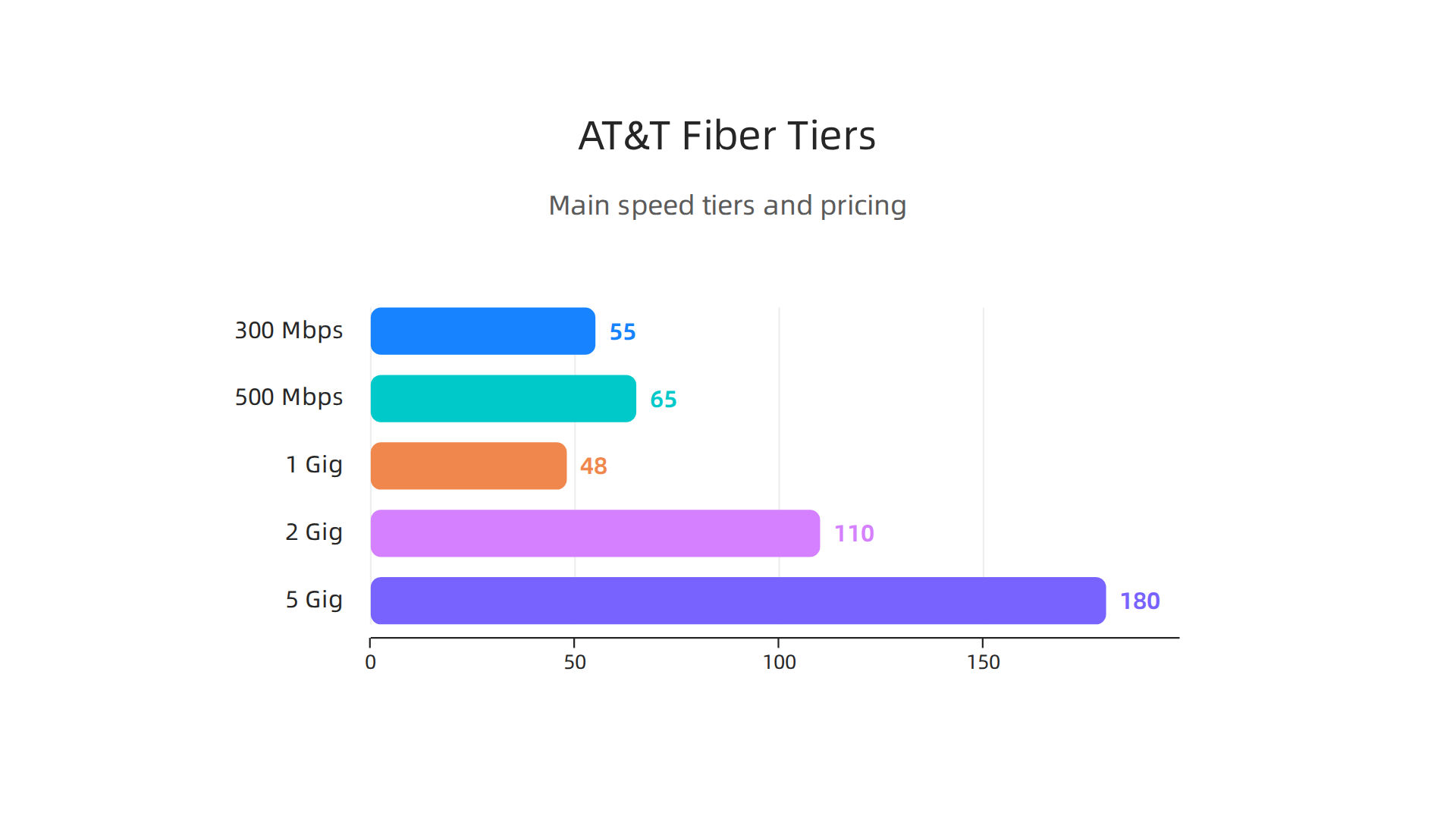
AT&T offers several speed tiers in 2026. Their main plans include 300 Mbps, 500 Mbps, 1 Gig, 2 Gig, and even 5 Gig for heavy users
cite CompareInternet.com. Pricing varies by location, but here is a general idea from their official site cite AT&T Fiber:
- 300 Mbps: around $55 per month
- 500 Mbps: around $65 per month
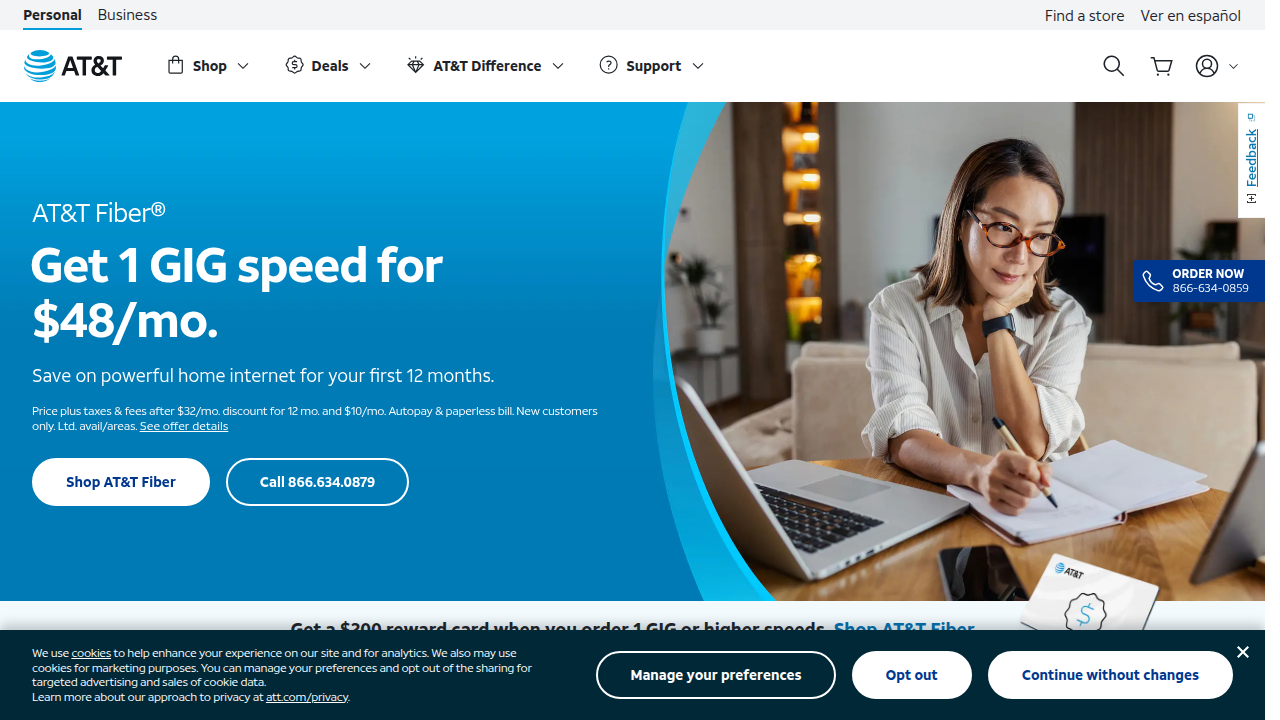
- 1 Gig: often $48 per month for the first 12 months, then regular price near $80
- 2 Gig: around $110 per month
- 5 Gig: around $180 per month
The big difference from Cox is pricing stability. AT&T Fiber price hikes are small and rare. According to a report from HighSpeedInternet.com, AT&T raised fiber prices by only $5 per month in November 2024 cite HighSpeedInternet.com. Compare that to Cox’s $10 to $20 jumps. That is a world of difference.
Also, AT&T Fiber has no data caps. You can stream in 4K, game online, and work from home without worrying about overage fees. That peace of mind is worth a lot.
One catch: availability. AT&T Fiber is not everywhere yet. It runs on a fiber network that is still expanding. But AT&T has been investing in nationwide expansion cite CompareInternet.com. Check their website to see if it is in your area. If you are stuck with DSL legacy, speeds will be lower.
For a full list of all their plans, check out the AT&T home internet plans page cite AT&T Internet Plans.
Feeling overwhelmed by all these details? Take a quick break and enjoy some funny news headlines to reset your mood. Then come back and make a smart choice.
Speed Showdown: Who’s Faster? (Without the Science)
So AT&T Fiber looks great on paper, but we all know ads don’t tell the whole story. The real question is: when you actually plug in and start streaming, gaming, or hopping on a Zoom call, which one delivers what you paid for? Let’s look at how Cox wifi plans and AT&T Fiber stack up in real life.
Real-world download speeds
Here’s the honest truth about cable internet: Cox often gives you about 80% to 90% of the advertised speed during peak hours. That means their 500 Mbps plan might actually give you 400 to 450 Mbps when the neighborhood is busy. Not terrible, but not what you expect.
AT&T Fiber is a different story. Because fiber isn’t shared the same way, you usually get 95% to 100% of the gigabit speed you signed up for. In fact, AT&T was named America’s Fastest Home Internet by Ookla for the fourth year in a row in 2026 cite AT&T Fastest. Ookla is the company behind Speedtest.net, so their data is solid.
One recent report shows Cox actually hit a median download speed of 311 Mbps in Phoenix, Arizona, which is impressive for cable cite Speedtest Phoenix. But fiber still edges ahead in consistency. If you want speeds that don’t crater during dinner time, fiber wins.
Upload speeds: the hidden pain point
For most of us, upload speed matters more than we think. Video calls, uploading large files, backing photos to the cloud, even live streaming games all depend on upload.
Cox wifi plans are built on cable technology, which means upload speeds are a fraction of download. You might get 25 Mbps upload on a plan that promises 500 Mbps down. That is fine for checking email, but frustrating for Zoom or Twitch.
AT&T Fiber gives you symmetrical speeds. That means if you buy 1 Gig, you get roughly 1,000 Mbps both down and up. Think about that. You can upload a 4K video in seconds instead of waiting minutes. For anyone working from home or creating content, symmetrical fiber is a game changer. A comparison from CompareInternet.com points out that AT&T Fiber offers 99% reliability, so that upload speed stays steady cite CompareInternet.
Latency: the invisible difference
Latency is the delay between you clicking and the game or website responding. High latency causes that awful lag in online shooters or stuttery video calls.
Fiber optic connections have much lower latency than cable. It is physics. Light travels faster in glass than electricity in copper. For gaming, that means you get a competitive edge. For video calls, it means less awkward pauses.
If you are a gamer or heavy video conferencer, the difference is night and day. Cox routers are fine, but when every millisecond counts, AT&T Fiber is the clear winner. And if you ever run into wifi dead zones, here is a helpful guide on fixing wifi dead zones that works for both providers [internal link: https://laughterandlaughter.com/fix-wifi-dead-zones-with-these-10-tips-for-a-stronger-signal].
Bottom line on speed
In a simple head-to-head:
- Download consistency: AT&T Fiber wins by delivering closer to advertised speeds.
- Upload: AT&T Fiber destroys Cox with symmetrical speeds.
- Latency: Fiber is king for gaming and video.
So if speed and reliability are your top priorities, and AT&T Fiber is available at your address, it is the better choice. If you are stuck with Cox, at least you know what you are dealing with. And if you need a good laugh to forget your buffering woes, check out these funny wifi disasters that might make you feel better about your setup [internal link: https://laughterandlaughter.com/funny-wifi-disasters-that-prove-your-router-has-a-sense-of-humor].
Price Tag Face-Off: Your Wallet vs. Your Sanity
Speed is great, but none of it matters if your internet bill makes you wince every month. Here is where Cox wifi plans and AT&T Fiber split paths hard.
The big trap with Cox pricing
Cox lures you in with a low intro rate. That first year feels like a steal. But here is the thing: that price almost always jumps after 12 months. Reviews.org points out that Cox has automatic price hikes of $10 to $20 per month once the promo ends
cite Reviews.org Cox hidden costs. So your $55 plan might suddenly cost $75 or more.
And it doesn’t stop there. Cox also hits you with a $100 professional installation fee [cite same Reviews.org source]. If you are trying to stick to a budget, those surprise charges can drive you crazy. For the full breakdown of what you actually pay, check out the real costs of Cox internet at HighSpeedInternet.com cite HighSpeedInternet.com Cox real costs.
On top of that, Cox enforces a 1.25 TB data cap. If you go over, they add $10 for every 50 GB cite Allconnect Cox plans. That can add up fast if you have a family streaming 4K movies or working from home.
AT&T Fiber keeps it simple
AT&T Fiber takes a different approach. Their pricing is much more straightforward. As of early 2026, you can get AT&T Fiber 100 for $45 per month cite CompareInternet AT&T expansion. There are no data caps. No surprise overage fees. And often no annual contract.
AT&T does sometimes raise prices a small amount, like the $5 increase they announced back in November 2024 cite HighSpeedInternet AT&T price hike. But even then, the total is still transparent and predictable compared to Cox.
If you want to see current offers, check the official AT&T Fiber page cite AT&T Fiber. They usually include a $200 reward card for higher tier plans cite AT&T internet.
Hidden fees you should know about
Here is a simple comparison of what sneaky costs each provider might add:
| Fee Type | Cox | AT&T Fiber |
|---|---|---|
| Installation | $100 professional fee | Often free or waived |
| Equipment rental | Monthly modem/router fee | Usually included |
| Data overage | $10 per 50 GB | None |
| Early termination | Depends on contract | Usually none |
| Automatic price hike | $10 to $20 after promo | Small and rare |
Cox does offer a prepaid option called StraightUp Internet for $50 per month with no hidden fees cite Cox StraightUp. That helps if you want predictability, but you lose speed and features.
The verdict on cost
If you hate surprise charges and want a bill that stays close to what you signed up for, AT&T Fiber wins again. Cox wifi plans might look cheap at first, but the fine print can make your wallet cry.
If you are stuck with Cox, at least know what you are dealing with. And if you need a laugh to distract from bill shock, browse through some funny news headlines that cure news fatigue [internal link: https://laughterandlaughter.com/funny-news-headlines-turn-your-daily-scroll-into-a-laughter-boost]. Sometimes laughter is the best medicine for a bad internet bill.
Reliability: How Often Will You Hold Your Modem Like a Snow Globe?
Price matters, but what good is a cheap plan if your connection drops during your favorite show? You know that feeling when the loading icon spins and you just stare at your modem, willing it to work.

That’s where reliability becomes the real hero.
Here’s the simple truth: cable internet like Cox wifi plans uses a shared line. Think of it like a party line from the old days. When everyone on your block hops online after work, the network gets crowded. That means slower speeds during peak hours. Fiber, on the other hand, gives each home its own dedicated line. So AT&T Fiber keeps humming along even when your neighbors are streaming 4K movies.
Weather also plays a role. Cable lines are more sensitive to rain, wind, and temperature swings. Fiber optic cables use light, not electricity, so they shrug off most weather issues. You’re less likely to lose your connection during a storm.
Now look at the numbers. According to reviews, AT&T Fiber offers 99% reliability, meaning it rarely goes down cite CompareInternet AT&T vs Cox. Cox cable typically lands around 99.5% uptime, but those small differences add up over a year. A 0.5% difference means about 1.8 extra days of potential downtime annually. When your work or entertainment depends on a steady signal, those hours matter.
If you’ve already got Cox and need to improve your situation, try our guide on fixing wifi dead zones [internal link: https://laughterandlaughter.com/fix-wifi-dead-zones-with-these-10-tips-for-a-stronger-signal]. It might save you from shaking your modem like a snow globe.
For the most solid connection, AT&T Fiber wins again. But if Cox is your only choice, at least know that peak hour slowdowns are normal. And if you need a laugh after buffering through a video, browse some funny wifi disaster stories [internal link: https://laughterandlaughter.com/funny-wifi-disasters-that-prove-your-router-has-a-sense-of-humor]. Sometimes a good giggle is the best way to reset.
Customer Service: A Comedy of Errors (With an Option to Cry)
You’ve been there. Your internet goes out, you call support, and you spend 45 minutes on hold listening to elevator music. When a human finally picks up, they read a script that has nothing to do with your problem. It makes you want to scream. Or laugh. Or both.
Here’s the thing about customer service for internet providers. It’s rarely great, but some companies make it feel like a comedy of errors. And others, well, they give you a real chance to stay calm.
Cox wifi plans often land on the frustrating side. According to surveys, Cox gets a resounding "meh" for customer service cite CompareInternet AT&T vs Cox. Long hold times. Scripted answers that don’t match your question. Billing errors that take weeks to fix. And data cap confusion? That’s a classic. You think you’re on an unlimited Cox wifi plan, then a surprise fee shows up. It’s enough to make you write a strongly worded email.
AT&T Fiber wifi customers report a different story. In 2026, AT&T Fiber ranked #1 in overall customer satisfaction for the fourth year in a row cite ACSI award. J.D. Power also named AT&T #1 in residential wired internet satisfaction in the North Central and West regions cite J.D. Power. Does that mean every call is perfect? No. You can still get a technician who runs late or a bill that needs explaining. But the overall experience is less stressful.
Common complaints apply to both providers. Technician no-shows happen. Billing confusion is real. And data caps? They’re the gift that keeps on giving. If you’re on a Cox wifi plan, you’ll hit that cap faster than you expect. AT&T Fiber wifi plans usually have no caps at all.
The bottom line? If you want fewer headaches when something breaks, AT&T Fiber wifi is the safer choice. But if Cox is your only option, just know you’re not alone. Sometimes the best way to deal with a bad support call is to laugh about it later. Check out some funny wifi disaster stories to lighten the mood. A good laugh might be the best customer service fix of all.
The Hidden Fees: Where Internet Plans Go to Die
You think you’ve found a great deal on a Cox wifi plan. The advertised price looks good, and the speeds seem fast enough. Then your first bill arrives, and suddenly that $55-a-month promise turns into something closer to $80. What happened? You just met the hidden fees.
Let’s break down where the money really goes so you can keep your sanity (and your wallet).
Equipment Fees
Both Cox and AT&T Fiber wifi charge you for the modem and router. But Cox’s fee tends to be higher. Depending on the plan, Cox charges around $10 to $15 per month for equipment rental. That adds up to $120 to $180 a year cite Reviews.org Cox hidden costs. AT&T Fiber wifi usually includes the router for free with fiber plans, saving you that recurring cost. If you’re comparing cox wifi plans, make sure to add equipment fees into the monthly total.
Installation Fees
Nobody likes paying someone to plug in a cable. Cox charges $100 for professional installation cite Reviews.org Cox hidden costs. Sometimes they waive it during promotions, but you have to ask. AT&T Fiber wifi often offers free standard installation, especially if you order online. Check the fine print before you sign up.
Data Cap Overage Fees
This is the big one. Cox wifi plans come with a 1.25 TB data cap each month. If you go over, they automatically add 50 GB blocks for $10 each cite Allconnect Cox data cap. Your overage fees can pile up to a maximum of $100 per month cite Cox add more data. AT&T Fiber wifi? No data caps at all. Zero. You can stream, game, and work without watching the meter.
The Bottom Line
When you add up equipment rentals, installation fees, and potential overage charges, a cheap-looking Cox wifi plan can cost significantly more than the sticker price. AT&T Fiber wifi keeps it simpler with fewer hidden fees. If you’re in an area where EPB internet or a fiber provider with no caps and free equipment is available, that’s even better.
If all this fee talk stresses you out, take a break and read some funny news headlines to reset your mood. Then come back and check the fine print before you buy. Your future self will thank you.
Real User Stories: The Good, The Bad, and The Buffering
Numbers and fees are one thing. But what’s it actually like to live with Cox wifi plans or AT&T Fiber wifi? Real customers have shared stories that range from smooth sailing to total chaos. Let’s look at some examples.
The Bad: When Buffering Becomes a Villain
One Cox customer in Phoenix told us their internet would drop every time the microwave ran. Not a joke. The technician came out and forgot his tools in the truck, so he had to borrow a screwdriver from the neighbor. That kind of service makes you wonder what you’re paying for.
Another user reported that their Cox wifi plans promised 300 Mbps, but they got 30 during peak hours. When they called customer support, they spent 45 minutes on hold only to be told to restart the router for the fifth time. According to the J.D. Power survey, Cox ranks below average in customer satisfaction cite compareinternet.com att vs cox review. Stories like this explain why.
The Good: Fiber That Actually Works
On the flip side, AT&T Fiber wifi customers often share glowing reviews. One couple in Dallas said the installation took 20 minutes and the technician even cleaned up the cable mess from their old provider. They’ve had the service for two years without a single outage.
That matches the data. AT&T Fiber has been ranked #1 in customer satisfaction for four years straight by the American Customer Satisfaction Index cite att fiber acsi award. Users in areas with EPB internet or other local fiber providers also report similar happiness.
It Depends Where You Live
Here’s the thing. Your experience often comes down to your region. In cities with strong fiber competition, providers work harder to keep you happy. In areas where Cox is the only option, service can be spotty. Some neighborhoods have access to newer ont internet infrastructure (the fiber terminal that brings light‑speed data to your home), which makes everything run smoother. If you can check what’s available in your specific block, do it.
If you’ve had your own internet nightmare (or comedy gold), we’ve got a collection of funny wifi disasters that prove your router has a sense of humor. Sometimes laughing about it is the only cure.
The Verdict: Which Plan Should You Choose? (And Why Your Choice Is Wrong)
Alright, let’s cut through the noise. After looking at the numbers, the real‑world stories, and the fine print, there’s a clear winner if you can get it: AT&T Fiber.
Here’s the cold truth. AT&T Fiber wifi has been ranked #1 in customer satisfaction for four years straight by the American Customer Satisfaction Index cite att fiber acsi award. J.D. Power also puts AT&T at the top in three out of four U.S. regions cite jd power att. Meanwhile, Cox wifi plans get a solid “meh” from most surveys, with customer support that makes you want to pull your hair out cite compareinternet cox meh.
So the verdict is simple: if AT&T Fiber is available on your street, go with it. If not, Cox becomes your fallback. But here’s the comedic twist. No matter which you pick, you’ll probably find something to complain about. Maybe your AT&T Fiber wifi drops during a Zoom meeting once a month, or your Cox wifi gives you 30 Mbps instead of 300. That’s just the internet gods having a laugh.
The real trick? Don’t settle. Negotiate, bundle, or switch every year. Call your provider and say you’re thinking of leaving.

Often they’ll drop your price or throw in a free upgrade. If you’re stuck with Cox in a monopoly area, look into local alternatives like EPB internet or even a fixed wireless option. And make sure your home’s ont internet (the fiber box on your wall) is up to date, because old gear slows everything down.
Want to avoid dead zones and squeeze the most out of whatever plan you choose? Check out these 10 tips to fix wifi dead zones for a stronger signal. A cheap mesh router can turn a mediocre connection into a surprisingly good one.
So pick the best plan you can, haggle like you’re at a flea market, and remember: you’re paying for reliable internet. Don’t accept less, and don’t be afraid to laugh at the absurdity of it all.
Summary
This article cuts through the marketing to compare Cox WiFi plans and AT&T Fiber in 2026, showing what you actually get for the money. It explains Cox’s main tiers (Connect, StraightUp, Gigablast), the common promotional traps, and the 1.25 TB data cap and overage fees that can blow up your bill. It contrasts that with AT&T Fiber’s symmetrical speeds, fewer hidden fees, and better real‑world consistency, while noting fiber’s limited availability. The guide also covers real user stories, reliability differences, installation and equipment charges, and customer‑service rankings. Practical advice shows how to estimate real monthly costs, when to pick fiber versus cable, and why you should haggle or switch yearly. Finally, it points to simple fixes for weak Wi‑Fi spots and suggests low‑income options and prepaid plans if you need predictability.