

Welcome to the Age of Absurdly Fast Internet (and the Jokes That Come With It)
Picture this: You’re finally settled on the couch, popcorn in hand, ready to stream the latest comedy special.

The comic sets up a killer punchline. And then… the dreaded spinning wheel of death. Buffering. Your internet modem just betrayed you at the worst possible moment. Sound familiar? We’ve all been there. And honestly, it’s a little funny. In a tragic way.
But here’s the good news. In 2026, the technology that connects you to the world has taken a giant, hilarious leap forward. We’re talking about the wifi 7 mesh router. This isn’t just a minor upgrade. It’s a whole new level of speed, stability, and even security. For example, Wi‑Fi 7 works with the latest security standard, WPA3, which protects your data much better than older protocols. The WiFi Alliance confirms WPA3 is the current standard for stronger encryption. So while you’re laughing at cat videos, your network is laughing at hackers.
Of course, no tech upgrade comes without its own set of ridiculous moments. Dropped signals, weird router names, and that one family member who still asks “Is the wifi modem working?” This article will give you real, helpful insights into wifi 7 mesh router tech, and we’ll throw in plenty of humor along the way. Because honestly, if you can’t laugh at your internet, you’re probably just crying.
Before we dive into the technical stuff, if you need a good laugh right now, check out this article about funny WiFi disasters. It proves that even routers have a sense of humor. And stick around, because later I’ll share a book that will keep the laughs coming long after your connection is rock solid. Ready to upgrade your home network and your mood? Let’s go.
Tri-Band? More Like Tri-Band of Brothers: How Wi-Fi 7 Avoids Traffic Jams
Let’s talk about traffic. Not the kind where you are stuck behind a slow driver. The kind where your video call freezes right when you make a funny face. Or your game lags one second before you win. It is frustrating. But a wifi 7 mesh router fixes this like a city planner who actually knows what they are doing.
Think of your old internet modem as a one lane road. Every device in your house fought for that single lane. Your laptop, your phone, your smart TV. It was chaos. Now imagine a three level super highway. That is tri-band.
A wifi 7 mesh router uses three separate bands.
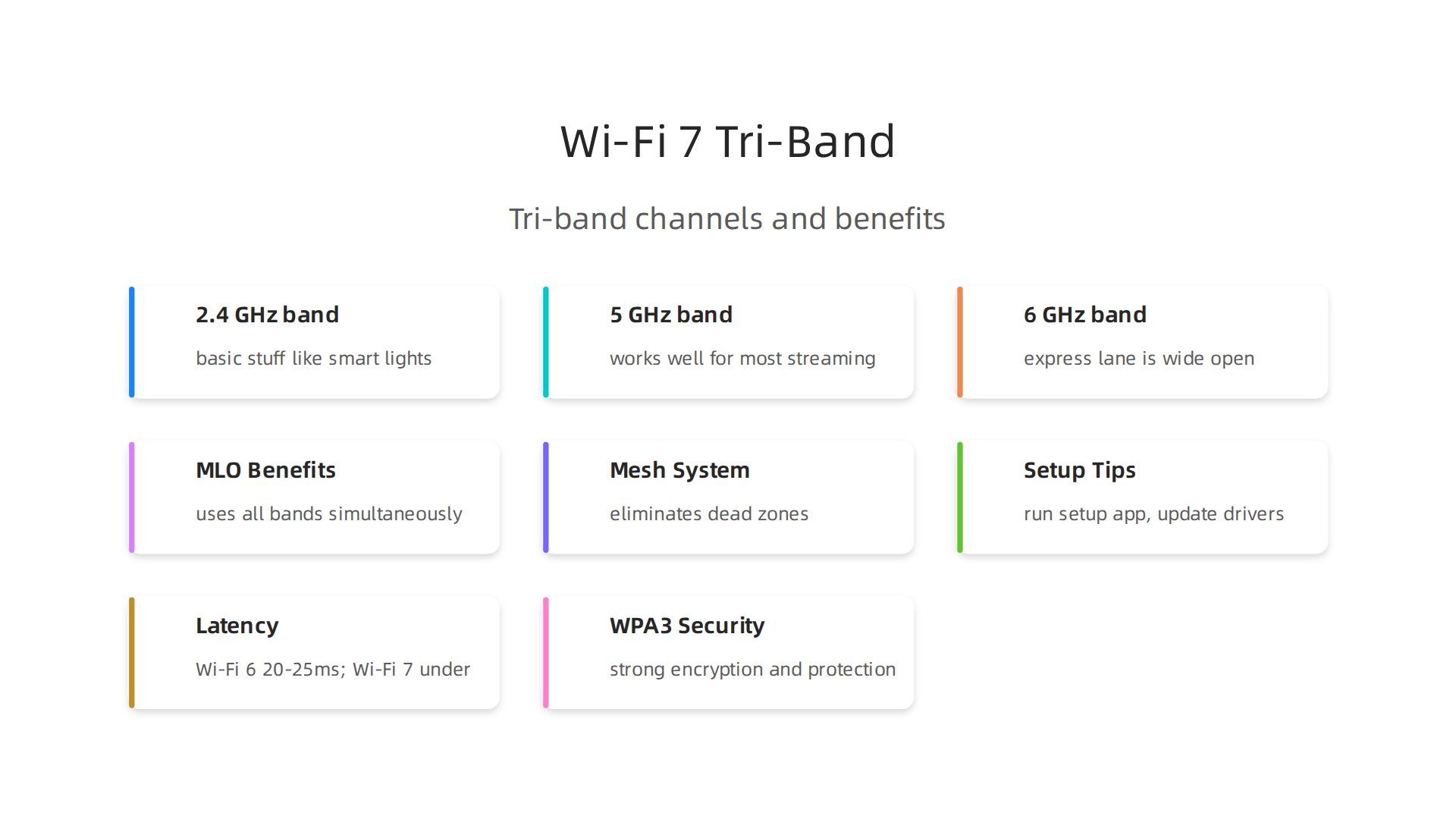
You have the 2.4 GHz band for basic stuff like smart lights. The 5 GHz band works well for most streaming. Then you have the new 6 GHz band. This express lane is wide open. ASUS confirms that Wi-Fi 7 uses massive 320 MHz channels on the 6 GHz band. That is double the space of older Wi-Fi. More space means no traffic jams.
But the real magic is how the router coordinates everything. It uses Multi-Link Operation, or MLO. Intel explains that MLO lets your device send and receive data across all three bands at the same time. Your phone is not stuck in one lane. It uses all of them at once.
Here is the funny part. Your router does a better job managing traffic than most real city planners. It never takes a coffee break. It never argues about budget cuts. It just moves your data smoothly. If your city ran as smoothly as your wifi 7 mesh router, you would never hit a red light.
Once your network is this fast and stable, what do you do with all that free time? You relax. You watch funny videos. You read something that makes you laugh out loud. Speaking of laughing, if you want a story that matches the speed and joy of your new connection, check out this ridiculous sci-fi adventure on Amazon. It is full of heart, wit, and chaos.
Want to make sure every corner of your home has perfect signal? Here are some tips to fix WiFi dead zones for good.
The 320 MHz Channel Is So Wide It Could Host a Parade
Now that your data has three whole lanes to play with (thanks to tri-band and MLO), let’s talk about just how wide those lanes actually are. We are skipping the standard road. We are talking about a superhighway designed for a parade.
A 320 MHz channel is basically a superhighway dedicated to your funny cat videos. Cisco confirms that Wi-Fi 7 can use up to 320 MHz of channel bandwidth, which is double the width of Wi-Fi 6 and Wi-Fi 6E. This is possible because the 6 GHz band is mostly untouched. T-Mobile notes this means more room for data and less interference. No old devices cluttering the space.
So when you hit download on a massive game or a 4K movie, your wifi 7 mesh router treats it like a giant parade float.

It just glides through without a single snag. Your old internet modem used to deliver data like a kid with a leaky balloon. Drip, drip, drip. Now it arrives faster than you can say the word "buffering".
Is your current wifi modem or router ready for this kind of speed? If you have dead zones holding you back, fix WiFi dead zones with these 10 practical tips.
All this speed is great, but you need content that keeps up. Why not fill that pipeline with something that makes you laugh out loud? This book series is packed with wit and chaos, perfect for cruising on your new superhighway.
Forget ‘Mesh’ — This Network Is a Comedy Club in a Box
You know that feeling when you walk from the living room to the bathroom and your Netflix show suddenly becomes a slideshow? That is the tragedy of "bathroom buffering." It’s the moment you realize your single hero router just can’t handle the whole house. But what if your network didn’t rely on one hero? What if it had a team?
A wifi 7 mesh router works like a group of friends passing your data around. Instead of one router screaming from the corner of your house, multiple nodes work together. Think of it as a comedy club in a box. Every seat is a good seat because the laughter (your signal) travels through several speakers. No one is stuck in the cheap seats.
Here is the best part: mesh networks are self-healing. If one node gets tired or has a hiccup, the others jump in. It never sleeps, like a dad after coffee. Always ready. Always wired.
With a traditional setup, your internet modem sends a signal to one brave router. That router might fight hard, but it can’t cover every corner. A mesh system eliminates dead zones.
No more buffering while brushing your teeth. No more leaning out the window for a signal.
And with Wi‑Fi 7, the connection between nodes is faster than ever. NETGEAR reports that Wi‑Fi 7 can deliver 2.4x the speed of Wi‑Fi 6 for the same radio configuration. That means your mesh handoffs happen in a blink.
If you are still wrestling with dead spots, you might get a laugh from these funny WiFi disasters that prove your router has a sense of humor. Sometimes a little humor helps while you fix your wifi.
Whether your wifi modem is cable or fiber, upgrading to a mesh system built for Wi‑Fi 7 changes everything. Just make sure your devices are ready. If you have Asus gear, update your asus wifi driver to get full speed.
Once your network is running like a well-oiled comedy club, fill that bandwidth with something worth laughing at. This ridiculous sci‑fi adventure is the perfect way to break in your new setup. No buffering. Just laughter.
Multi-Link Operation: Your Router, the Ultimate Multitasker (Unlike You)
Be honest. Can you cook dinner, help with homework, and answer a work email all at once? Probably not. But your wifi 7 mesh router can. That is thanks to a feature called Multi-Link Operation (MLO). Think of it as the router’s secret superpower.
MLO lets your router send and receive data across all three bands at the same time.

As Wikipedia explains, it increases capacity by simultaneously using the 2.4 GHz, 5 GHz, and 6 GHz bands. Instead of picking one highway, your data rides three lanes at once. No traffic jams.
Here is the real magic. In a busy home, your wifi modem and router are constantly juggling devices. Your spouse is on a Zoom call. Your kid is gaming. You are streaming a comedy special. Without MLO, the network gets congested. Your video buffers at the punchline. With MLO, every device gets a clear channel. The Cisco guide notes that wider 320 MHz channels let more data travel without interference. That means lower lag and fewer drops.
MLO also makes your network more reliable. If one band gets noisy, the router instantly shifts traffic to another band. It never gets distracted. Unlike you, who just burned the toast while answering that email.
If you are dealing with screen time battles in a crowded home, check out our guide on whether certain shows are good for kids. MLO means the streaming never stutters, even when everyone is watching.
Now that your network can multitask like a champion, put it to work. Laugh First Today with a book that will keep you chuckling from start to finish. No buffering. Just laughter.
The Humor in Latency: Why 1ms Delay Is Quirkier Than You Think
You know that awkward pause after a bad joke when the room goes silent? That is latency. But instead of being the silence before laughter, it is the delay between you clicking and the action happening. With Wi‑Fi 6, that pause feels like waiting for a late laugh track. The network takes 20 to 25 milliseconds to respond, according to The Network DNA. That is enough time to wonder why your video froze at the punchline.
Now enter Wi‑Fi 7. This new standard cuts that delay down to under 2 milliseconds in real‑world use and can reach sub‑1 millisecond in perfect conditions, as Batra.ai explains. That is faster than you can think “I hope this doesn’t buffer.” Everything feels instant, like a comedian who nails the timing without a single beat missed.
Here is the funny part. Lag will soon become a relic, just like the screech of dial‑up internet. You will one day say to your kids, “Back in my day, I had to wait a whole 20 milliseconds for my video to load.” They will not believe you.
To enjoy this near‑zero latency, you need a wifi 7 mesh router paired with a fast internet modem. Make sure your wifi modem is up to date, and if you use an ASUS wifi driver, keep it current for the best performance. And if you ever had a hilarious Wi‑Fi disaster, check out these funny wifi disasters that prove your router has a sense of humor.
Speaking of comedy, if you want to laugh more every day, Want More Good Humor? Grab a book series that keeps the chuckles coming, no buffering required.
Security That’s Actually Funny: WPA3 and the Password That Doesn’t Need to Be ‘password123’
Let’s be honest. You have used a terrible password at some point. Maybe it was “password123” or “letmein” or just your street name. The good news is that Wi‑Fi 7 makes your bad password habits way less dangerous than they used to be.
Wi‑Fi 7 requires WPA3 as the mandatory security standard. That is a huge upgrade from WPA2. WPA3 fixes the handshake vulnerabilities that made WPA2 so easy to crack. According to SecureW2, WPA3 adds individualized data encryption on open networks. Even on a public coffee shop hotspot, no one else on that network can snoop on your traffic.

The WiFi Alliance officially recognizes WPA3 as the latest security standard for Wi‑Fi networks.
Here is where it gets funny. WPA3 uses Simultaneous Authentication of Equals, or SAE. Instead of the old handshake hackers could brute force while you slept, SAE makes guessing your password almost pointless. Malwarebytes explains that WPA3 fixes major vulnerabilities and introduces significant improvements in encryption and authentication. An attacker needs to try again after every single attempt. They will give up before lunch.
Think of the top 10 worst passwords. “123456.” “qwerty.” “admin.” With WPA2, those were an open door. With WPA3, even a weak password gets much stronger protection. According to Cerium Networks, Wi‑Fi 7 combined with WPA3 also uses Multi-Link Operation to isolate traffic and reduce attack surfaces. So you get better security and faster speeds at the same time. You still should pick a better password, but your wifi 7 mesh router is doing the heavy lifting for you now.
To get this level of security, make sure your internet modem and wifi modem support WPA3. Keep your asus wifi driver updated if you use ASUS gear. Many modern routers already ship with WPA3 enabled by default. For a simple way to stay safe while laughing on the go, check this guide on the best portable hotspot 2026 for streaming stand-up comedy without buffering.
Want more good humor in your life? Grab a book series that makes you laugh and think. Laugh First Today with a ridiculous sci-fi adventure that keeps the chuckles coming.
Backhaul Bandwidth: The Unsung Hero That Deserves a Stand-Up Special
You ever notice how a mesh Wi‑Fi system can still have slow spots? The Wi‑Fi signal shows full bars, but your stand‑up special keeps buffering. The problem might not be your signal strength. It might be the backhaul.
Think of backhaul like the roadie behind the stage. That roadie moves gear from one side of the venue to the other so the show runs smoothly. In a mesh network, backhaul is the connection between your main router and the satellite nodes. It’s the invisible highway that carries your data from node to node.
With older mesh systems, that backhaul often shared the same frequency band as your devices. That’s like asking the roadie to carry amps while also playing guitar. Wi‑Fi 7 finally gives the roadie its own ride. According to a comparison by Zion Communication, Wi‑Fi 7 is a “wired‑side upgrade in disguise” because it dramatically improves the connection between nodes without slowing down your streaming or gaming.
Wi‑Fi 7 lets you use the 6 GHz band as a dedicated backhaul channel. That leaves the 5 GHz and 2.4 GHz bands open for your phones, laptops, and smart TVs. The result? Your wifi 7 mesh router runs a lot faster and more reliably. According to NETGEAR, Wi‑Fi 7 speeds are up to 2.4 times faster than Wi‑Fi 6 for the same radio configuration. A lot of that speed comes from smarter backhaul.
Backhaul is the best supporting actor that never wins an Oscar. It does all the heavy work without taking a bow. To make sure your backhaul works at full speed, keep your gear updated. If you’re using ASUS equipment, update the asus wifi driver regularly. Also make sure your internet modem and wifi modem can handle the speeds your mesh system wants. If you already deal with dead zones, check out these 10 tips for a stronger signal to help your backhaul shine.
Want more good humor? Meet a book series made for readers who like funny and thoughtful. Start laughing today with a ridiculous sci‑fi adventure that keeps the chuckles coming.
Setting It Up: A Comedy of Errors (That Actually Works This Time)
You know that feeling. You rip open the box of your new wifi 7 mesh router, plug everything in, and wait for magic. Then you realize one node is sitting behind your TV, another is too close to the microwave, and your phone app keeps saying “scanning for nodes.” Classic.
Setting up a mesh system used to feel like a second job. You had to log into a web interface, change IP addresses, and pray. According to a 2026 guide on Common Asus AiMesh Problems, even today “setting up a mesh is easy, but maintaining stability can be tricky.” That’s the honest truth.
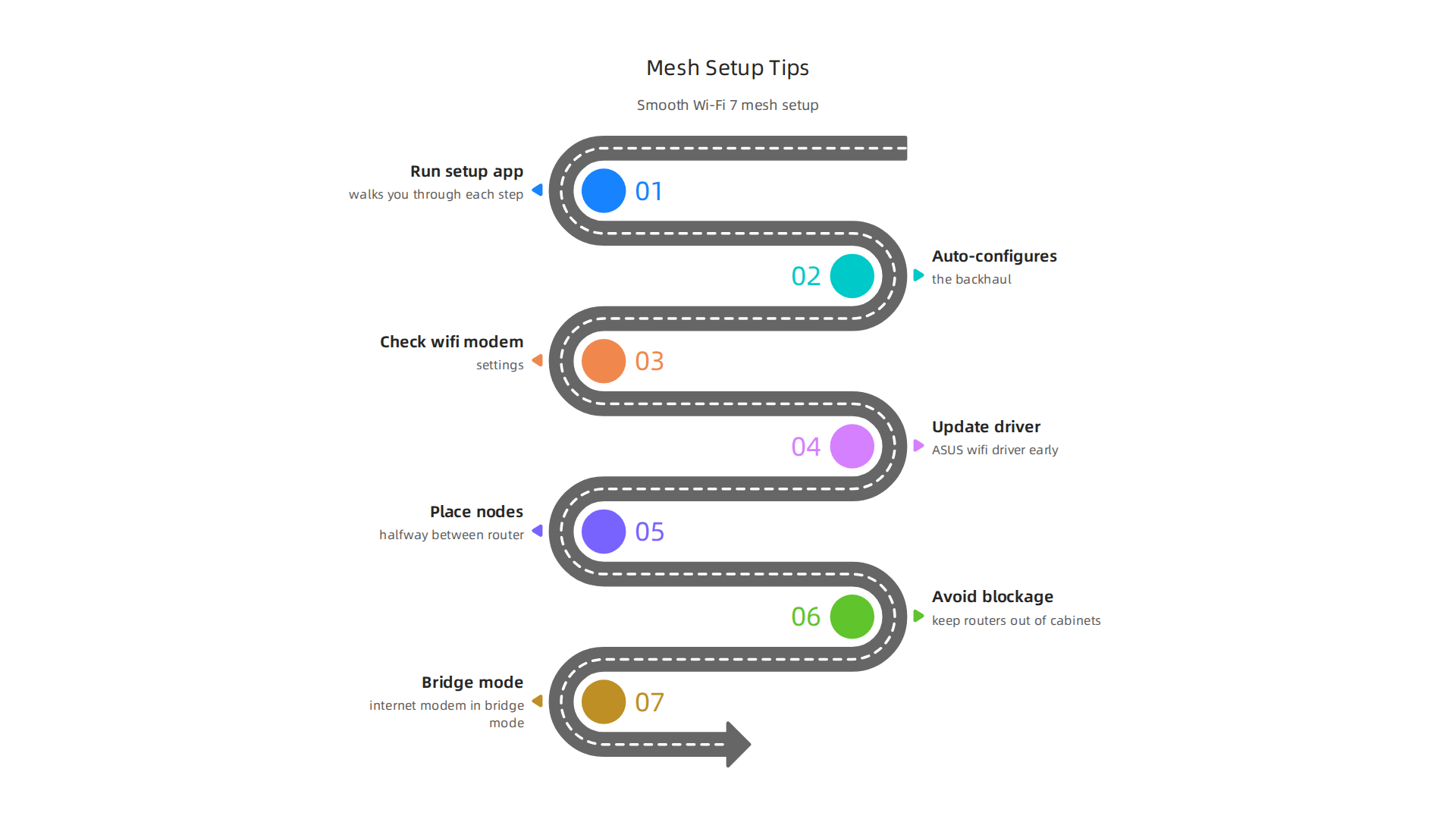
The good news? A wifi 7 mesh router makes the opening act much smoother. The app on your phone walks you through each step. It auto‑configures the backhaul. You don’t need a degree in network engineering to get your stand‑up special streaming.
Still, you can stumble. A common mistake is placing nodes where coverage is already weak. Another is forgetting to put your internet modem in bridge mode, which causes a double NAT conflict. That’s the top reason TP‑Link Deco systems keep disconnecting, according to a troubleshooting guide from ModemGuides. Also, keep your routers out of cabinets. Even a simple blockage can kill your signal.
My advice? Run the setup app, check your wifi modem settings, and if you use ASUS gear, update the asus wifi driver early. Then place your nodes halfway between the main router and your problem spots.
If you already hit a snag, this funny take on router disasters might make you feel better.
Once your network is humming, you deserve a real laugh. Check out a ridiculously fun sci‑fi adventure that keeps the chuckles coming. Because after you fix your wifi, you need something good to watch.
Summary
This article introduces Wi‑Fi 7 mesh routers and explains why they’re a major upgrade for home networks, delivering faster throughput, far lower latency, and stronger security. It walks through the key technologies—tri‑band operation, 6 GHz 320 MHz channels, and Multi‑Link Operation (MLO)—and shows how they work together to eliminate congestion and make mesh handoffs seamless. The piece also covers practical topics like backhaul importance, WPA3 security improvements, and common setup errors (placement, double NAT, outdated drivers). Readers will learn what to check on their modem and devices, how to place nodes for best coverage, and simple troubleshooting steps so they can actually enjoy lag‑free streaming, gaming, and video calls. The tone mixes clear technical guidance with light humor to keep the advice approachable and usable.