

Introduction: Why This Router Needs a Sense of Humor
Let’s be honest for a second. You just unboxed your new xfinity wifi gateway, followed the instructions, and waited. And waited. And then you called support, reset the modem twice, and contemplated throwing the whole thing out the window. Sound familiar? You are not alone.

A recent survey found that 68% of U.S. households reported Wi-Fi issues in the past year, and more than half of those people are ready to switch providers over the frustration. That statistic comes from a 2025 TechSee survey, and it lines up with other data showing that over 58% of consumers deal with connectivity problems at least a few times every month. The truth is, even the best hardware can make you want to scream.
So why does this matter to you? Because stress from technology is real, and it steals your time and your peace of mind. But here is the thing: laughter is a free, proven stress reliever. Instead of letting a blinking router ruin your day, you can laugh at the absurdity of it all.
This review is different. I am going to give you the honest, unfiltered truth about the Xfinity WiFi Gateway. But I am also going to bring the jokes. Because sometimes the best way to deal with a dead zone is to laugh about it first.
If you already know your home has trouble spots, you might want to check out these tips to fix wifi dead zones right after this. And if you are the type who enjoys a good chuckle at your own tech misfortunes, I have a feeling you will appreciate these funny wifi disasters that prove your router has a sense of humor.
Stick with me. By the end of this review, you will know if this gateway is right for your home. And you might even crack a smile along the way.
[Want More Good Humor?] (https://doridiculous.com/) Meet a book series made for readers who like funny and thoughtful.

It Arrives in a Box the Size of a Small Cat – and Weighs About as Much as One
So you survived the initial rage and are ready for round two. The doorbell rings. A delivery person drops off a relatively compact box. You pick it up and immediately wonder if they shipped you a paperweight by mistake.
This is your first real clue about the xfinity wifi gateway. It is dense. It has heft. It feels like they packed in enough tech to communicate with Mars, or at least with your neighbor’s smart fridge. You slice open the tape, pull out the sleek, angular device, and are greeted by a constellation of blinking lights.
There is no universal guide to what these lights mean. Solid blue usually means "I am working." Blinking amber means "I am thinking about working." And off means "You might need a wifi extender for pc after all." You stare at it. It stares back. This is where your relationship begins.
The design is all sharp corners and serious lines. It looks like a prop from a sci-fi movie where the computer only speaks in riddle. The moment you hold it, you realize that first impressions are everything. This device has personality. It demands attention.
You immediately start brainstorming names for it. "The Blinking Brick." "The Reason I Am Late to Zoom Calls." You are not alone in this habit. There are entire lists online dedicated to 800 funny router names proving that we all try to humanize these strange plastic boxes.
This hardware makes a bold statement. But the real question is whether it can back up that attitude. If these blinking lights stress you out already, you might relate to some of these funny wifi disasters that prove your router has a sense of humor.
Because sometimes the weight of the box is just the beginning of the adventure.
The Setup: A 20-Minute Quest Involving a Confusing App and a Flashlight
Unboxing the xfinity wifi gateway was easy. The setup? That is where things get interesting. You muster your courage, download the Xfinity app, and hope for a smooth ride. Spoiler: it is rarely smooth.

You tap "Set Up New Device." The app asks for your address. You type it in. It freezes. You restart. The app tells you to plug in the coaxial cable. You look at the back of the gateway and realize the port is hidden behind a tangle of cords. This is when you learn that the most important tool for setup is a flashlight.
The process often feels like a comedic trial. You follow the on screen prompts. You wait for the blinking lights to turn solid. Instead, you get a cryptic error message that says something like "Activation Failed: GW-001." No context. No solution. Just a red light staring back at you.
You are not alone in this struggle. A 2025 survey found that 68% of U.S. households reported Wi‑Fi issues in the past year, and 67% contacted their provider at least once. Setup glitches are a big part of that frustration.
Your mind starts wandering. Maybe you need a wifi extender for pc to fix the dead zone in your office. Or maybe you should skip the gateway entirely and grab a pcie wifi card for your desktop. The latest wifi 8 standard promises faster speeds, but your new gateway is stuck on older tech.
After 20 minutes of tapping, restarting, and swearing under your breath, the app finally says "Connected!" You smile. Then you realize you forgot to plug in the Ethernet cable for your gaming PC. The quest is not over yet.
But hey, you made it. Now you can enjoy the internet. And if you still have dead zones, check out our guide to fix wifi dead zones with these 10 tips for a stronger signal.

Speed Tests: It’s Fast, But Do You Really Need to Download a Movie in 30 Seconds?
So you finally got your xfinity wifi gateway connected. Now you run a speed test. Your jaw drops. The app shows 700 Mbps down. That is fast. Really fast. According to Xfinity Support, their gateways support speeds up to 700 Mbps. But here is the truth: you will rarely see those numbers in real life.
Your actual speed depends on many things. How far you are from the gateway. How many walls are in the way. How many devices are fighting for the signal. The latest wifi 8 standard promises even more speed, but most homes do not need a gigabit connection to stream Netflix or scroll Instagram.
Think about it. You spend 30 seconds downloading a movie. Then you spend two hours watching it. Does that 30 seconds matter? Not really. What matters is whether the video buffers during the funny scenes. What matters is whether your Zoom call drops when you walk to the kitchen.
The gateway from Xfinity is a solid choice for dependable speeds and strong coverage. RTINGS.com named it an excellent option for most households in 2026. But if your connection still feels slow, the issue might not be speed. It might be coverage. Your home might have dead zones that no speed test can fix.
If you are tired of buffering during your favorite comedy special, consider upgrading to a mesh system. Check out our guide on WiFi 7 mesh router upgrades that end buffering and bring the laughs to fill those dead zones with consistent signal.
In the end, raw speed is like a sports car. It looks great on paper. But you still need to drive it on the same old roads. Focus on stability and coverage. Your streaming sessions will thank you.
The Lights: A Disco, a Warning System, or Just Showboating?
So your xfinity wifi gateway is running. The speed test looked good. You feel proud. Then you look at the front of the box.
Lights. Blinking. Flashing. Changing colors.
What does it all mean? Is your gateway trying to warn you about something? Or is it just putting on a light show for fun?
You are not alone if you find this confusing. Most people have no clue what the solid green light means versus the blinking orange one. Here is a simple translation guide to turn your frustration into a laugh.
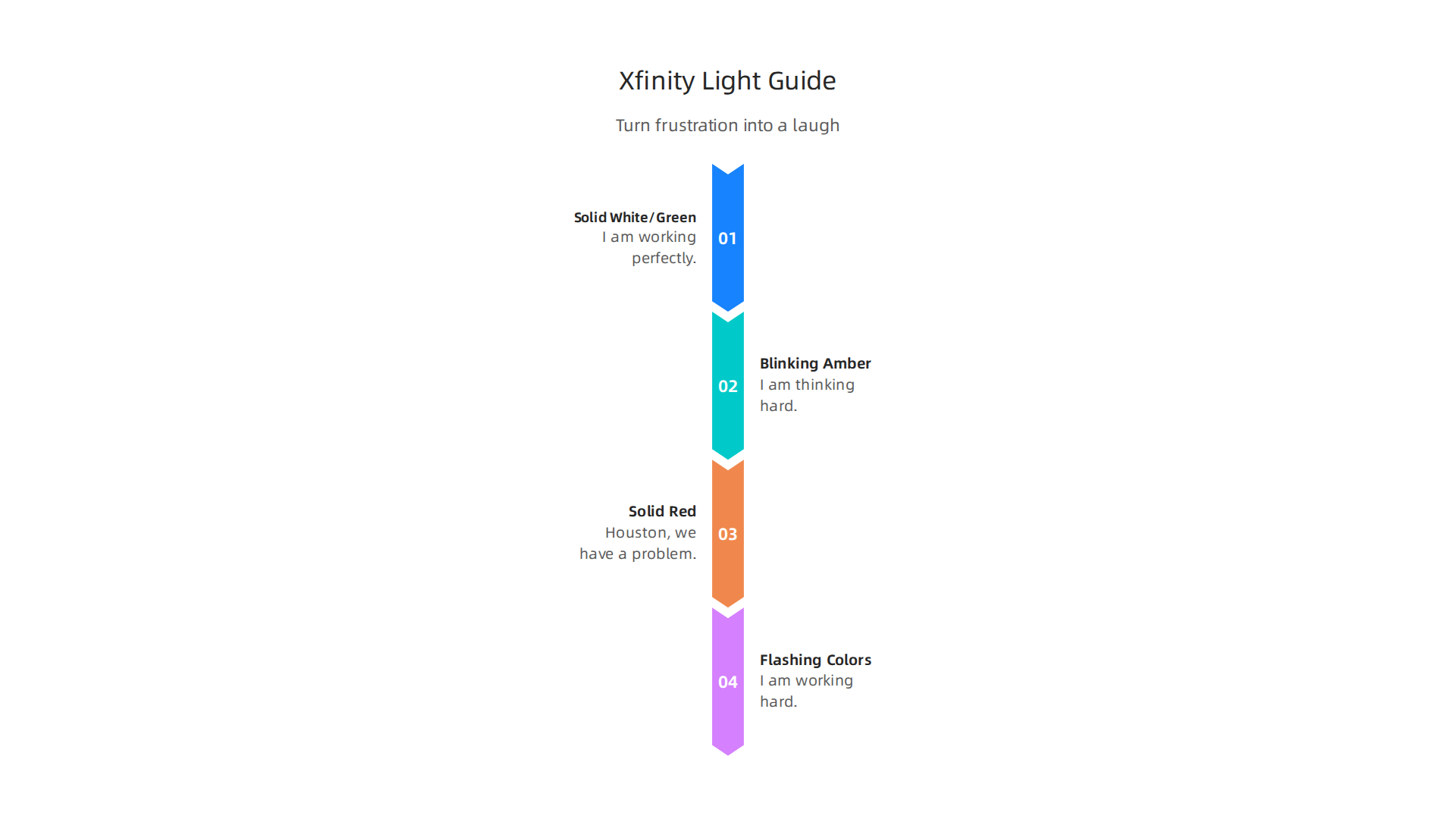
Your Gateway’s Light Language:
- Solid White or Green: "I am working perfectly. Do not touch me. Go watch your show."
- Blinking Amber: "I am thinking hard. Maybe an update is downloading. Maybe I am just bored. Give me a minute."
- Solid Red: "Houston, we have a problem. Check your cables or call your provider."
- Flashing Colors: "Someone in your house is gaming. Or streaming 4K. Either way, I am working hard."
Some people find the lights helpful. A red light is a clear sign that something is wrong. But others find them annoying. Why does a gateway need to look like a tiny disco ball in your living room?
Making fun of tech problems is a great way to deal with them. Giving your network a silly name is another way. People love coming up with funny router names to make their neighbors smile.
If that red light keeps popping up, it might mean you have a dead zone in your home. Your gateway is basically crying for help. That is when you know it is time to fix the signal.
For more laughs about tech problems that hit close to home, check out these funny WiFi disasters that prove your router has a sense of humor.
Next time you see those lights flash, just smile. Your gateway is not angry. It is just trying to talk to you. And maybe it is telling a little joke.
Parental Controls: You Can Block Your Kids’ Devices, but Can You Block Their Attitude?
Your xfinity wifi gateway can stop your kids from binging YouTube at 2 AM. But can it stop the dramatic eye roll when you cut their Wi-Fi at dinner? Nope. That battle requires a different tool.
The good news is that the gateway gives you serious power. The Xfinity Advanced Gateway includes parental controls that let you pause the internet, set time limits, and block specific sites right from the Xfinity app. You can even see which devices are online and how much data each one uses. That means you can finally prove that someone is playing games instead of doing homework.
But here is the honest truth. The app is not always simple to use. Some features are easy to find. Others feel like they are hiding from you. You might tap around for five minutes just to find the bedtime schedule. It can be a little frustrating.
Still, a little humor helps. Instead of yelling about screen time, you can turn the internet rules into a joke. Tell your kids that the gateway has a "sass detector" and will shut off their TikTok if they roll their eyes too hard. Not true, of course, but it makes the conversation lighter.
If your kid has a desktop PC and a weak signal, you might need to add a wifi extender for pc to make sure their schoolwork actually loads. The gateway alone might not cover every corner of your house. And if they complain about lag, that is your chance to smile and say "No kidding."
For more ideas on keeping screen time fun and fair, check out this guide on is Blippi good for kids. It helps you decide what content is actually worth fighting for.
The gateway can block devices. But the attitude? That one is all you.

WiFi Range: It Reaches the Shed, but Your Fridge is a Dead Zone
So you have the xfinity wifi gateway set up, and the signal seems strong in the living room. You can stream a movie just fine. But then you walk into the kitchen to grab a snack, and bam. Your phone shows one bar. Your fridge just became a WiFi dead zone.
It is a little ridiculous, right? A giant metal box full of cold air can ruin your signal faster than a brick wall. And that is the honest truth about the gateway. The range is generally solid, but every home has those spots where the signal just gives up.
The newer gateways, like the one Comcast launched with WiFi 6E, are pretty powerful. They use three bands including a 6 GHz band to boost capacity. That helps a lot. But no router can magically bend radio waves around a microwave or through a thick concrete wall.
Here is the thing. Obstacles are the real enemy.
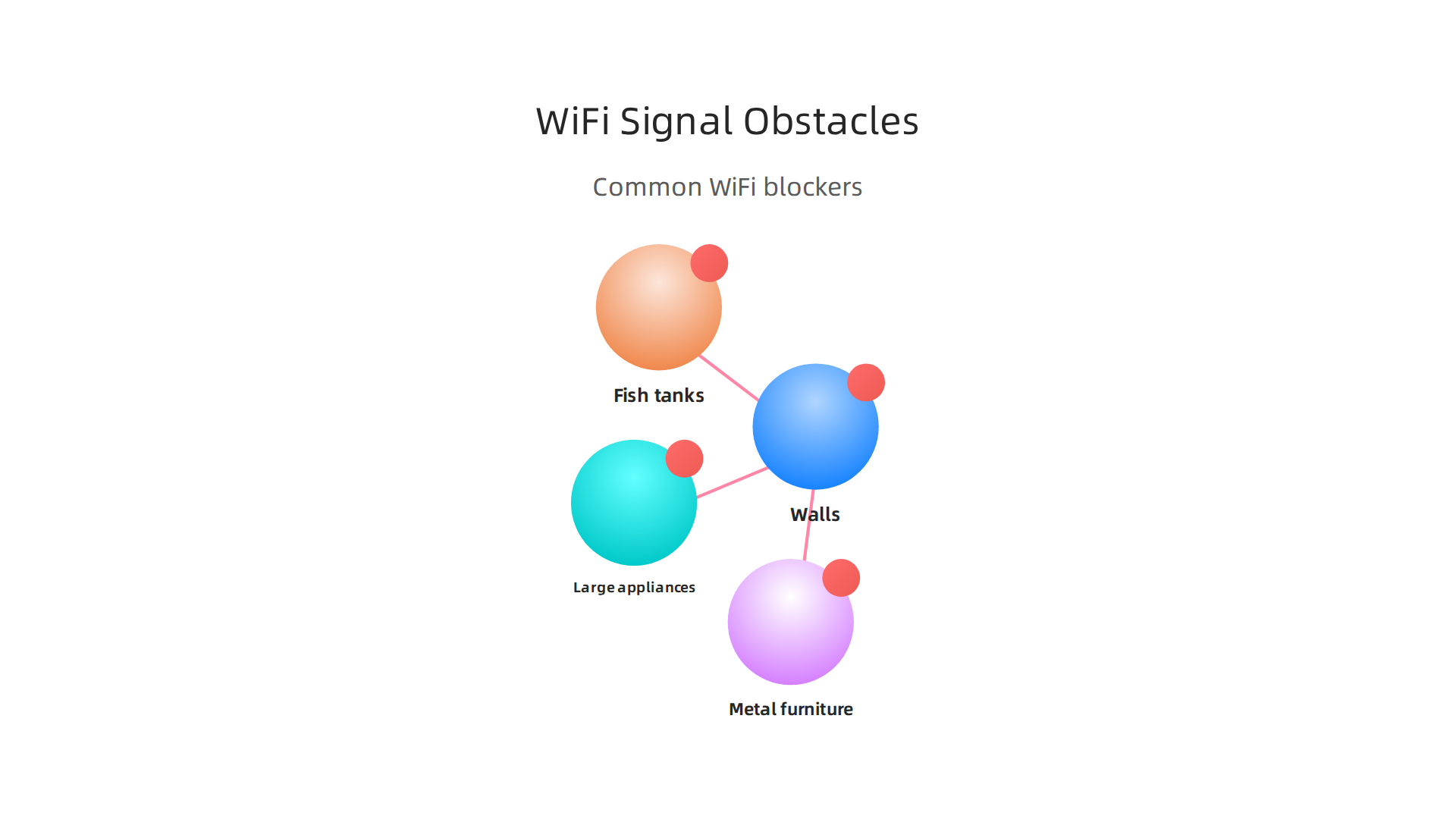
Think about what is between your gateway and your office desk.
- Walls, especially ones with metal studs or insulation.
- Large appliances like fridges, washing machines, and microwaves.
- Fish tanks. Yes, water blocks WiFi.
- Furniture with a lot of metal.
If you have a desktop PC in a room with a weak signal, you might want to add a pcie wifi card. That can give your computer a much better connection than a tiny USB dongle.
But before you buy anything, try a simple trick. Move the gateway. Seriously, just moving it a few feet can change everything. Put it high up on a shelf, away from other electronics. Do not hide it behind the TV.
If you still have dead zones, there are easy fixes. You can learn more in this guide on fix wifi dead zones with these 10 tips for a stronger signal.
The gateway can handle a lot. But it cannot fight physics. So give it a good spot and watch those dead zones shrink.
The Price: Is It Worth the Monthly Fee, or Should You Just Buy a Rocket?
Here is the question that everyone asks eventually. Is the xfinity wifi gateway rental fee worth it, or are you just paying for a paperweight?
Let us talk numbers. Renting the gateway costs you around $15 per month. That does not sound like much. But over two years, that is $360. Over five years, you have paid over $900. For a device that Comcast probably bought wholesale for $100.
Now compare that to buying your own router. You can get a solid WiFi 7 router for around $200 to $300 in 2026. Something like the ASUS RT-BE96U, which HighSpeedInternet.com ranks as the best overall for Xfinity, will pay for itself in about a year and a half.

After that, you are saving money.
But there is a catch. Hidden fees can sneak up on you.
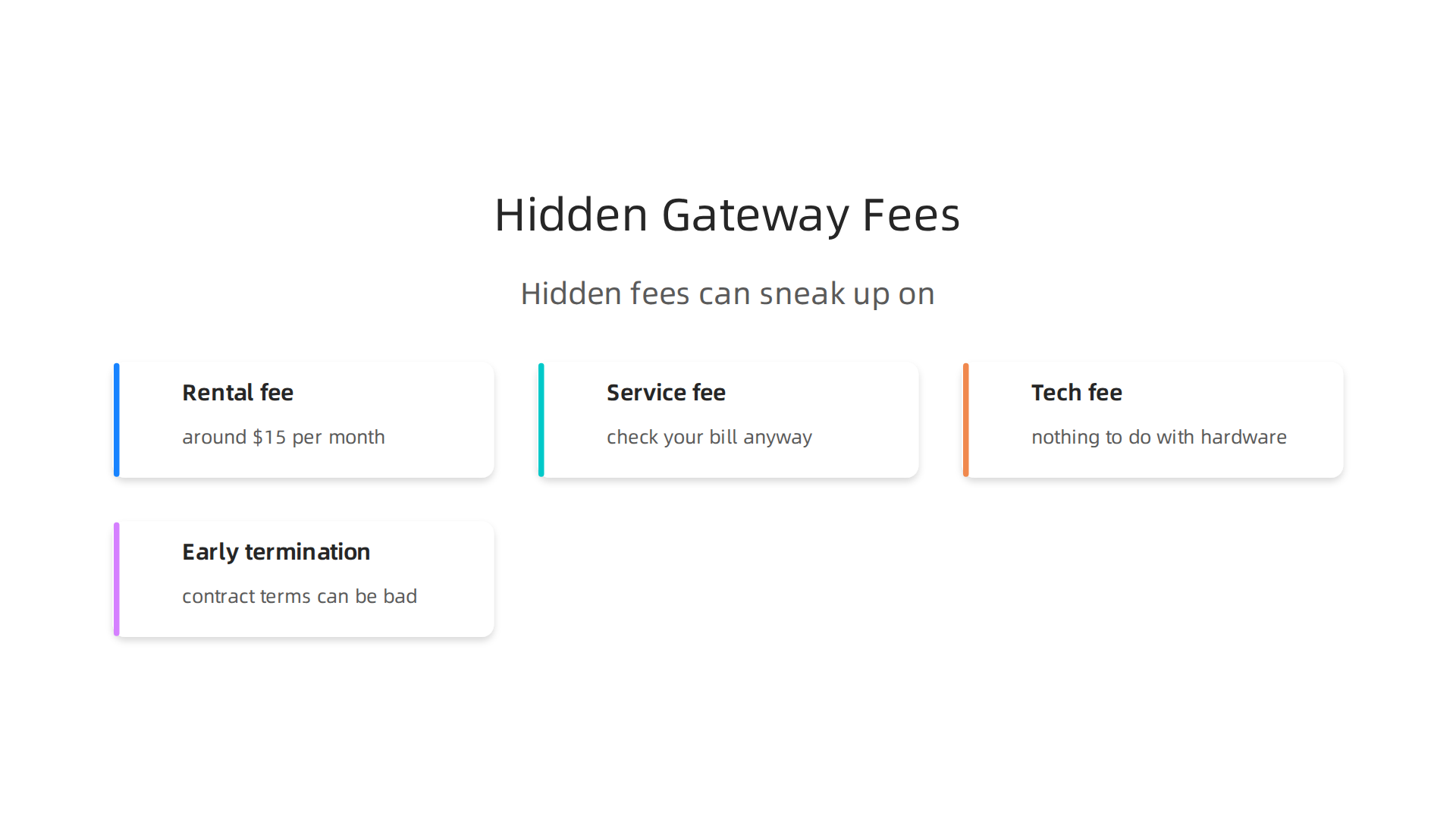
If you return the gateway and use your own router, you save the rental fee. But check your bill anyway. Sometimes Comcast charges a "service fee" or "tech fee" that has nothing to do with the hardware. Always read the fine print. And if you cancel early, the contract terms can be laughably bad. Early termination fees are real.
Here is the thing. The gateway is fine for basic use. If you just stream Netflix and scroll social media, renting is easy. No setup headaches. No troubleshooting. Comcast handles everything.
But if you want real performance, especially for gaming or working from home, buying your own router makes more sense. The best routers in 2026, like those tested by Tom’s Hardware and RTINGS.com, blow past the gateway on speed, range, and stability.
If you go the DIY route, you might also want a pcie wifi card for a desktop PC in a far room. That combo beats any rental.
The value depends on your specific needs and your sense of humor. Do you like paying $15 every month forever? Or would you rather buy your own gear and laugh all the way to the bank?
Want to see what a modern WiFi 7 mesh system can do? Check out this comparison of WiFi 7 mesh router upgrades that end buffering.
The Verdict: A Solid Router That’s Also Good for Stand-Up Material
Let us be fair here. The xfinity wifi gateway is not a bad piece of hardware in 2026. It delivers solid speeds and simple setup. HighSpeedInternet.com confirms it can handle most households just fine. But the real entertainment comes from the rental model itself. Paying $15 every month forever? That is a comedy bit waiting to happen.
The quirks are what make this relationship truly memorable. You might need a wifi extender for pc if your desk is far from the living room. Or you might start daydreaming about wifi 8 while your rented gateway does the bare minimum. If you can laugh at these small tech absurdities, you will love this setup. It is a router for people who do not take technology too seriously. Funny WiFi disasters that prove your router has a sense of humor captures this exact vibe.
So here is the final verdict. The xfinity wifi gateway is worth it if you want a simple connection and a good laugh. But if you want peak performance, look at the best routers tested by Tom’s Hardware or a mesh system from RTINGS.com. Your internet should make your life better, not drain your wallet. Choose the path that leaves you with more money and more time for the things that actually make you smile.
The Therapy of Laughter: Why Reading This Review Is Better Than Meditation
You made it to the end of this review. And maybe you are thinking, "Did I just waste five minutes reading jokes about a router?" Actually, no. You might have done something good for your brain.
Let me explain. Life in 2026 is loud. News alerts ping all day. Work emails pile up. The to-do list never shrinks. Most people reach for meditation apps or breathing exercises to cope. But research shows that laughter does the same job, sometimes faster.
Here is the science. Laughter lowers levels of the stress hormone cortisol.
It also activates the reward center in your brain, the same one that lights up when you eat chocolate or hear good news. The VA Whole Health Library confirms that genuine laughter triggers real chemical changes in your body. A review of studies in Psychology Today adds that laughter therapy can reduce anxiety, depression, and perceived stress. That is not fluff. That is peer-reviewed evidence.
So when you chuckled at the idea of paying $15 a month forever for a rented gateway, you were not just being cynical. You were giving your nervous system a mini vacation. The Stanford Lifestyle Medicine team puts it simply: laughter offers significant reductions in depression, anxiety, and even insomnia. No meditation cushion required.
The trick is that humor makes information stick. You will probably remember that the xfinity wifi gateway has decent speeds longer than you would remember a dry spec sheet. That is because your brain tags funny moments as important. They get stored in a special folder marked "worth keeping."
If you want to keep the good vibes going, you might like our collection of funny news headlines. Or learn how to maximize your streaming comedy for a daily dose of stress relief. The point is, you do not have to sit in silence with your eyes closed to feel better. Sometimes you just need a good laugh about how ridiculous internet plans can be.

Want More Good Humor? A book series made for readers who like funny and thoughtful.
Summary
This review takes a candid, often funny look at the Xfinity WiFi Gateway, walking readers through unboxing, setup, real-world speeds, indicator lights, parental controls, range limits and the ongoing rental cost debate. It explains why the gateway performs well for most households, where it falls short (coverage and advanced performance), and how common frustrations—like confusing activation errors or dead zones—can usually be fixed with simple tweaks or add-ons. The article compares renting versus buying your own router, describes practical fixes such as moving the gateway or adding extenders/PCIe cards, and points readers toward mesh and portable hotspot options if they need better coverage. Along the way it decodes the gateway’s blinking lights, offers usable parental-control tips, and keeps a light tone to make the tech feel less stressful. By the end you’ll know what to expect during setup, how to interpret speed results, when the rental fee is worth it, and which upgrades will actually solve buffering and coverage problems.